
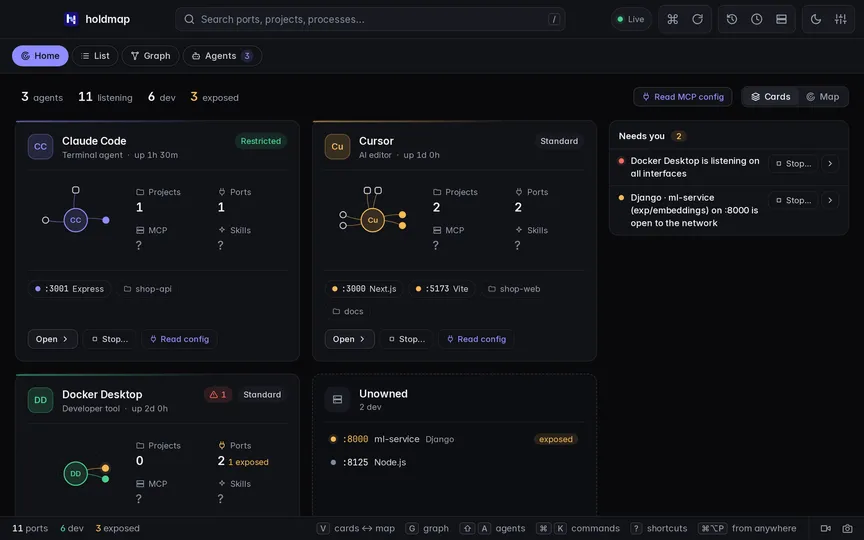
See who's on :3000. And which agent started it.

See every agent with its MCP servers, skills and tools, and the apps and ports it holds — access marked seen, inferred or unknown. Then stop only what you choose, after a plan.

Latest release v0.9.0 CLI, TUI, desktop app and MCP server What's new

A tour of holdmap with sample data: the Home overview of agents and their ports, the machine map, a stop plan for shop-web on port 3000, the port becoming free, and the MCP servers and skills each agent can use. A tour of holdmap with sample data: the Home overview of agents and their ports, the machine map, a stop plan for shop-web on port 3000, the port becoming free, and the MCP servers and skills each agent can use.
Browser demo with sample data. Stops are simulated.
Home

Every agent, MCP server, skill and port. In one view you control.

Home shows what is running on this computer, what each agent is set up with, and what needs you.

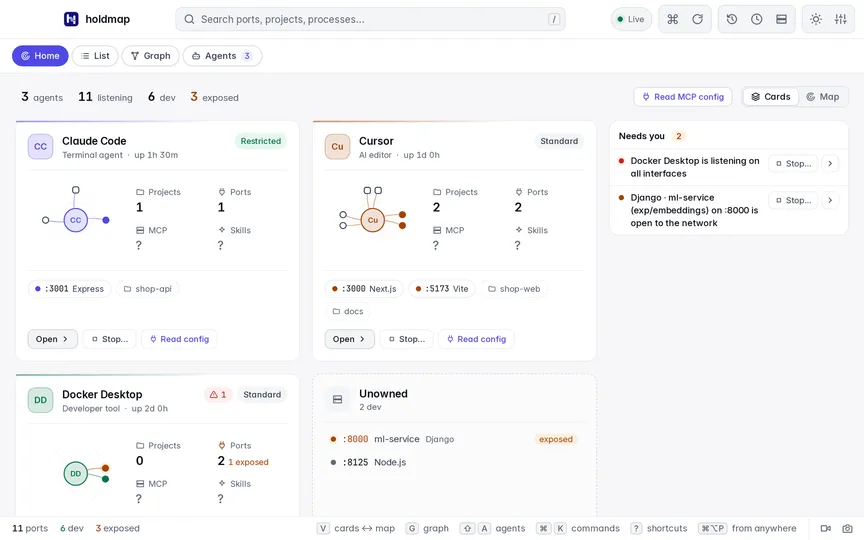
Home as Cards: one card per agent with its projects, ports, MCP servers and skills, and a Needs you list beside them. Home as Cards: one card per agent with its projects, ports, MCP servers and skills, and a Needs you list beside them.
  • Cards or Map. Toggle at the top right or press V; the choice is remembered.
  • Timeline. Map adds uptime, ports and MCP over time; j/k step through it.
  • Needs you. Open-to-network ports, conflicts and protected processes, beside both views.

Each agent's capabilities

Opt in once to see each agent's MCP servers (how they launch, pinned or not, remote host, running now), skills, built-in tools, permission rules and instruction files.

  • Env and header names only, never values
  • Prompts, chats and file bodies are never read
  • MCP servers are never started or connected to

holdmap agents --capabilities · MCP list_agents with include_capabilities

Agents, tools and skills

Stop a port, safely

Click any port on Home — a card chip, a map node or a timeline pin — for Details or Stop…. Stop always shows the plan first.

Cursor's card on Home with the menu for port 3000 open: Details and Stop… Cursor's card on Home with the menu for port 3000 open: Details and Stop…
The stop plan for port 3000: SIGTERM, then SIGKILL after 5 seconds, then a check that the port is free, with Cancel and Stop. The stop plan for port 3000: SIGTERM, then SIGKILL after 5 seconds, then a check that the port is free, with Cancel and Stop.
Desktop guide
Analyzers

Scan your agents' skills. See exactly how.

Run scanners you choose on your agents' skills and MCP packages: NVIDIA SkillSpector, a built-in OSV.dev lookup, one-click presets for Cisco Skill Scanner, OSV-Scanner, Trivy and Bandit, or any MCP server. Every analyzer is drawn as a graph, from what it reads to where its findings show up.

On main, not in a published release yet. Downloads stay on v0.9.0.

SkillSpector's pipeline: inventory, the fields it gets, the sandbox, the analyzer, the parser, findings by severity, and where they show: Home, Needs you and Insights. The last run's details are open below. SkillSpector's pipeline: inventory, the fields it gets, the sandbox, the analyzer, the parser, findings by severity, and where they show: Home, Needs you and Insights. The last run's details are open below.
  • Pipeline. Inventory, fields sent, sandbox and hosts, tools, parser, findings and where they appear, with the last run's numbers.
  • Coverage. Which analyzer looked at which agent and skill, and what it found.
  • Any MCP server. Add a command, a local URL or one your agents use; pick its tools and map their inputs from each schema.
  • Presets. Cisco Skill Scanner, Google OSV-Scanner, Trivy secrets and Bandit: local, no LLM or key, off until you approve. The list shows which ones are installed.
  • Can't be talked out of it. Every run gets a copy of the skill without scanner settings files (.bandit, osv-scanner.toml, .trivyignore…) it could ship to hide its findings.

Nothing runs without your OK

Each analyzer is off until you review a sheet built from your real inventory: the folders, the exact fields and tool calls, the network hosts and the sandbox.

  • A private copy of each folder, a cleared environment and a time limit
  • Your environment, tokens and secrets are never passed; keys live in the OS keychain
  • Your agents' MCP servers are never started or connected to on their own
  • Only a short title, location, fix and severity are kept, locally

Pinned, so a server can't change behind your back

holdmap pins an MCP server's tool list and descriptions. If any tool changes, the next run stops before calling anything and asks you to review the difference. Descriptions that look like tool poisoning are flagged.

  • No elicitation, sampling or roots offered to servers
  • A server on another machine needs an explicit opt-in and gets names only, never paths or file contents

holdmap analyzers add --mcp · tools · map · holdmap insights --format sarif

Release highlights

0.9.0 is here. Capture, explore, understand.

What's new
  • Keep a still alongside the video

    Capture the Holdmap view, choose a screen or window, or borrow the active recording source without another picker. Review and save the PNG locally while video keeps running.

    Take a PNG snapshot
  • Read the service graph at a glance

    Compact disconnected services, readable starting zoom and a full canvas make local relationships easier to explore. Search services, ports and PIDs while keeping observed neighbors in context.

    Explore the service graph
  • Understand each capability

    Explore declared skill purposes, retain the source Map and Compare observed definitions. Purpose, Source, Evidence and Activity keep file presence distinct from loading, approval and use.

    Explore MCP & skills

0.9.0 adds PNG snapshots, the readable service graph and the capability explorer. Read the full 0.9.0 release notes.

Live demo

Try the real app. Right here.

Real desktop UI with sample data. Stops and power actions are simulated. PNG snapshots and screen recordings stay local; screen capture asks what to share.

Full screen (opens in a new tab)
Open the live demo
In your terminal

Same answers, one command away.

holdmap agents maps agents and tools; read reports support --json, stop actions support --dry-run, and exit codes tell scripts what happened.

CLI reference
~/code/shop-web — zsh
$ holdmap list
 PORT  PROTO  ADDRESS            PID  PROCESS             WHAT
 3000  TCP    127.0.0.1, ::1   43000  node                Next.js · shop-web (feat/checkout)
 3001  TCP    127.0.0.1, ::1   43001  node                Express · shop-api (main)
 5000  TCP    0.0.0.0, [::]      522  ControlCenter       AirPlay Receiver [protected]
 5173  TCP    ::1              45173  node                Vite · docs (main)
 5432  TCP    0.0.0.0, [::]     1290  com.docker.backend  PostgreSQL · container shop-db-1
 6379  TCP    127.0.0.1          611  redis-server        Redis
 8000  TCP    0.0.0.0          48000  Python              Django · ml-service (exp/embeddings)
11434  TCP    127.0.0.1          835  ollama              Ollama

8 ports · 5 dev · 3 exposed to the network · 38 ms
The problem

Port 3000 is taken, again. But ports aren't the whole story.

You're running Claude Code in one terminal, Cursor in another, Docker on the side, and three agents started their own servers. A PID and kill -9 don't tell you who owns what — or how to stop only the right thing.

Without holdmap
$ PORT=3000 npm run dev
Error: listen EADDRINUSE: address already in use :::3000
$ lsof -i :3000
COMMAND   PID USER   FD   TYPE  NODE NAME
node    43000  dev   23u  IPv6  TCP *:hbci (LISTEN)
$ kill -9 43000
$ PORT=3000 npm run dev
Error: listen EADDRINUSE: address already in use :::3000
# …the parent respawned it. Which agent started that?
  • No idea which project, agent or tool
  • kill -9 skips cleanup
  • No view of what each agent can reach
With holdmap
$ holdmap agents
Claude Code  pid 51200 · 214 MB · 3% CPU · 1 stoppable
  folders   shop-api  ~/code/shop-api
  ports     :3000  shop-api (Vite)  · stoppable
  children  vite (shop-api)
  access    listener :3000 observed · network policy unknown
Docker Desktop  pid 1290 · tool · 2 ports
$ holdmap agents claude --stop-ports --yes
  · sent SIGTERM to npm (51199), node (51201)
✔ :3000 is free
$ PORT=3000 npm run dev  ✓ Ready in 1.4s
  • Names the agent, footprint and access
  • Stops only what that agent started
  • Every fact marked seen, inferred or unknown
Features

Agents, tools and every port. Stops only what it should.

  • A safe stop, with protection

    Preview the plan, stop the whole dev-server tree (SIGTERM, then SIGKILL) and check the port is free. The OS, shells, IDEs and AI agents are protected.

    The stop dialog: the plan for port 3000, with Cancel and Stop buttons. The stop dialog: the plan for port 3000, with Cancel and Stop buttons.
  • Why it's busy, in plain English

    A dev-server tree, a container, a system service, AirPlay Receiver, TIME_WAIT or another user.

    Port 3000's detail pane: shop-web, Next.js, branch feat/checkout, and a recommended action. Port 3000's detail pane: shop-web, Next.js, branch feat/checkout, and a recommended action.
  • Project and branch aware

    The project, git branch and framework (Next.js, Vite, Django, Postgres…) or the Docker, Podman or OrbStack container behind each port, with real memory for the whole app.

    The port list with project names, frameworks, branches and memory. The port list with project names, frameworks, branches and memory.
  • Everything from the keyboard

    A searchable command palette and predictable arrow navigation. Turn off single-key shortcuts while keeping modifier shortcuts and native controls available.

    The command palette filtered to stop actions. The command palette filtered to stop actions.
  • The service graph

    Which local services talk to which, grouped by Compose, Kubernetes or workspace. Stop a whole stack in dependency order.

    Project stacks
    The service graph: observed connections between shop-web, shop-api, redis and db. The service graph: observed connections between shop-web, shop-api, redis and db.
  • Computer → Footprint → Project

    Zoom from this computer and its agents to their folders, tools, ports and a single source tree. Inspect memory, CPU, parent processes and access, with each fact marked seen, inferred or unknown. Reveal a folder, open it in your editor, or stop only the services an agent started.

    The capability explorer leads with declared skill purposes in Explore, retains source relationships in Map, and shows exact observed definitions in Compare. File presence does not prove loading, approval or use.

    Explore the agent map MCP and skills explorer
    $ holdmap agents
    Claude Code  pid 51200 · 214 MB · 3% CPU · 1 stoppable
      folders   shop-api  ~/code/shop-api
      ports     :3001  shop-api (Vite)
      access    sandbox unknown · network :3001 only
    $ holdmap agents claude --stop-ports --dry-run
    Dry run: nothing was changed.
    The Footprint map with Computer and Project zoom controls, agents, folders, tools and observed connections The Footprint map with Computer and Project zoom controls, agents, folders, tools and observed connections
  • Record a screen or window

    Choose what to share, then save available MP4 or GIF exports locally. Record for up to two minutes with no microphone or system audio. Close and reopen the latest preview while Holdmap stays open; nothing is uploaded.

    Each new video recording asks for a screen or window. Export formats depend on the encoder available in your app or browser.

    PNG snapshots of the Holdmap view or a selected screen/window. An active recording can supply the still without another picker or stopping the video.

    Screen recording and saving PNG snapshots
    Screen recording consent explains local MP4 and GIF exports, the two-minute limit and the screen picker Screen recording consent explains local MP4 and GIF exports, the two-minute limit and the screen picker
  • See agent connections and recorded calls

    Connections maps observed processes, listeners and live sockets. Calls shows tool and agent activity reported by integrations you configure. Find failures or missing completion, sort by reported duration, and inspect the reported parent context. Optional recording keeps sanitized metadata in memory on this computer; payload fields are excluded.

    Socket relationships do not reveal messages. Session grouping does not imply communication; parent links come from supplied trace context.

    Agent Flow and recording
    Example recorded agent trace with parallel tools, an explicit handoff and a timeline; the failed execution step is labelled Example recorded agent trace with parallel tools, an explicit handoff and a timeline; the failed execution step is labelled
  • MCP for AI agents

    Claude, Cursor and VS Code can list ports, inspect agents and tools, find a free port and stop their own services. Stops require a reviewed, one-use confirmation. Protected targets are refused.

    // tools/call parameters
    { "name": "list_agents", "arguments": {} }
    → Claude Code · Cursor · Docker Desktop
    { "name": "stop_agent_ports",
      "arguments": { "agent": "claude",
        "dry_run": true } }
  • Scriptable to the core

    Read reports support --json, stop actions support --dry-run, and exit codes mean something.

    $ holdmap list --json \
        | jq '.entries[0].project.name'
    "shop-web"
  • A TUI, over SSH too

    Run holdmap for a fast terminal UI. holdmap ssh devbox reads another machine without installing anything there.

    $ holdmap ssh devbox
    connected · 14 ports · linux
Interfaces

One core. Four ways in.

The same Rust core decides who owns a port and whether it's safe to touch. Each interface only renders and confirms what it says.

A scriptable CLI

Look, act, wait and free ports from any shell or script — and see which agents and tools started them. Plain-English answers for people, --json for tools, and exit codes that mean something.

  • holdmap agents maps agents, tools and apps to their footprint
  • holdmap agents --capabilities explicitly inspects supported MCP definitions and skill files
  • holdmap agents claude --stop-ports stops only what that agent started
  • holdmap explain 3000 says who holds it and what to do
CLI reference
~/code/shop-web
$ holdmap agents
Claude Code  pid 51200 · 214 MB · 3% CPU · 1 stoppable
  folders   shop-api  ~/code/shop-api
  ports     :3001  shop-api (Vite)  · stoppable
  access    sandbox unknown · network :3001 only

$ holdmap explain 3000
● Port 3000 is held by a Next.js dev server (node, PID 43000) in ~/code/shop-web (branch feat/checkout), running for 2h 3m.
  → Gracefully stop npm run dev (2 processes) and verify port 3000 is free.

$ holdmap free-port --near 3000
3002
Install

Up and running in a minute. One command, or a normal download.

The installer sets up the CLI, TUI and MCP server. The desktop app is a separate download. Latest release: v0.9.0.

1 Install the CLI

curl --proto '=https' --tlsv1.2 -LsSf https://github.com/santoshshinde2012/holdmap/releases/download/v0.9.0/holdmap-installer.sh | sh

Installs to ~/.local/bin and adds it to your PATH if needed. Then run holdmap.

2 Get the desktop app Optional

Apple silicon (aarch64) runs natively without Rosetta. Choose Intel (x64) for Intel Macs.

The current app is ad-hoc signed and sealed, but isn't Developer-ID signed or notarised. Verify your download below, open it once, then use System Settings › Privacy & Security › Open Anyway (macOS 14 and earlier: right-click the app, then Open).

All desktop downloads

Desktop builds cover Apple silicon and Intel Macs, plus x64 Windows and Linux. Linux ARM64 is available for the CLI; there is no prebuilt ARM64 desktop installer.

Verify what you downloaded

Every release ships SHA-256 checksums and GitHub build provenance.

# the checksum file sits next to the download
shasum -a 256 -c holdmap-desktop-macos-arm64.sha256
# Windows (PowerShell): compare with the .sha256 file
Get-FileHash holdmap_0.9.0_x64-setup.exe
# where it was built, and from which commit
gh attestation verify holdmap_0.9.0_aarch64.dmg \
  --repo santoshshinde2012/holdmap

Homebrew and npm registry installs are not available. The release assets include an npm package tarball.

Updating from an older release? Run the current CLI installer above again. Desktop v0.9.0 requires a manual update: quit Holdmap, install the matching download above, then reopen it and check Settings → About. A signed updater feed is not included in this release. Updating the CLI does not replace the desktop app. See troubleshooting.

Security and privacy

It stops processes, so it's careful.

Reviewed stop plans, process-identity checks and a restricted desktop webview. Restart history keeps raw commands needed to relaunch. Unix state uses private file permissions; Windows inherits the chosen folder's ACLs. Read the security policy.

  • Local inspection

    Scans this computer and probes localhost. SSH connects to hosts you choose; desktop update checks use GitHub Releases. Project commands and SSH configuration can make their own network requests.

  • No product analytics

    No Holdmap account or product analytics. This site has no analytics scripts. Optional screen capture and agent activity recording start only when you choose them.

  • Credential redaction

    Recognized credentials in command displays are redacted; arbitrary positional secrets can be missed. Default scans do not open agent chats or settings. MCP & skills inspection is explicit: bounded config files may contain credentials, whose values are excluded from results. Only allowed skill-header metadata is retained, not instructions. Activity recording excludes payload fields before retention.

  • Protected by default

    Hard protection cannot be overridden. Soft protection needs the CLI's explicit --allow-protected option or a desktop review that permits it. MCP refuses all protected targets.

See every agent. Free the right port.

Install the CLI in one line, or grab the desktop app.

curl --proto '=https' --tlsv1.2 -LsSf https://github.com/santoshshinde2012/holdmap/releases/download/v0.9.0/holdmap-installer.sh | sh