
What's new
What's new in holdmap: analyzers coming next, and 0.9.0 with Home as Cards or Map, a richer agent inventory, PNG snapshots and the capability explorer.
The changelog records every change, and releases has the notes for each version.
Coming in the next release
These are on main and not in a published installer yet:
- Analyzers (opt-in). Scan your agents’ skills and MCP packages with SkillSpector, the built-in OSV.dev lookup, presets for Cisco Skill Scanner, OSV-Scanner, Trivy and Bandit, or any MCP server. Each one is off until you approve exactly what it gets, and runs on a copy in a sandbox. Analyzers.
- Needs you everywhere.
holdmap needsand the MCP toollist_needsshow the same list as Home, including analyzer findings. Agents → Insights collects every agent’s findings. - MCP:
list_analyzers,list_insightsandlist_needsbring the server to fourteen tools.
0.9.0
holdmap 0.9.0 brings Home, a richer agent inventory and port stops from Home, plus PNG snapshots, a readable service graph and the Explore / Map / Compare capability explorer.
Home, agent inventory and port stops
- Home shows every agent as Cards or a Map with a Timeline of uptime, ports
and MCP, plus a Needs you list. Press
Vto switch. Home. - Agent inventory adds how each MCP server launches (runner, package, pinned or not), its
remote host, env/header names, whether it runs now, permission rules, safety settings,
instruction files and built-in tools:
holdmap agents --capabilities, MCPlist_agentswithinclude_capabilities, and the desktop cards. Values, prompts and file bodies are never read. Launch, run state and permissions. - Stop a port from Home: click a card chip, map node or timeline pin for Details or Stop…; the stop plan opens first. Narrow windows list each agent’s ports with the same menu.
PNG snapshots alongside video
Use the camera button, Take snapshot… or ⇧S to choose what to capture:
- Holdmap view: the visible app viewport, without screen-sharing permission.
- Screen or window: an explicit system picker chooses the source, then sharing ends after the still is captured.
- Recording source: while video is active, take a still from its existing source without another picker or stopping the video.
Review and save the PNG locally. Images preserve their aspect ratio within 3840×2160 and 32 MiB. Closing the preview or cancelling a save retains it for retry; a new capture replaces it only on success. Discard snapshot, reload or quit clears the retained image. The desktop opens a native save dialog; the browser starts a download. Nothing is uploaded.
App-view snapshots work separately from display-capture support. The native selected-source fallback requires macOS 14 or later; other platforms use browser screen-sharing support and their system picker. Snapshot sources and limits. Video recording retains its two-minute, no-audio MP4/GIF workflow and now uses the video icon.
A readable service graph
Graph opens with a full canvas until you select a service. Both layouts pack disconnected services and separate clusters compactly. Cards start at a readable size; Fit all services in view offers an overview and Reset to readable size restores readable cards.
Search names, projects, exact port:3000 / :3000 or pid:43000, with every query term
required to match. Immediate observed neighbors keep connection context without becoming
extra matches. List filters stay separate. Options holds Traffic, External and Legend;
keyboard activation and focus return work through the selected service’s details.
Layout proximity never invents a connection. Service graph guide.
Explore, map and compare capabilities
Open Agents → MCP & skills to explicitly inspect the existing supported local sources. Explore leads with declared skill purposes, Map retains source relationships, and Compare shows exact observed definitions across two contexts. Matching process observations group while retaining their original PIDs; a group is not a verified conversation or session.
Select a card for Purpose, Source, Evidence and Activity. File presence does not establish loading, approval or use. Tools explains Catalog not reported instead of claiming zero tools. No new client catalog, recording adapter or name-based activity join is introduced; coverage and privacy limits are unchanged.
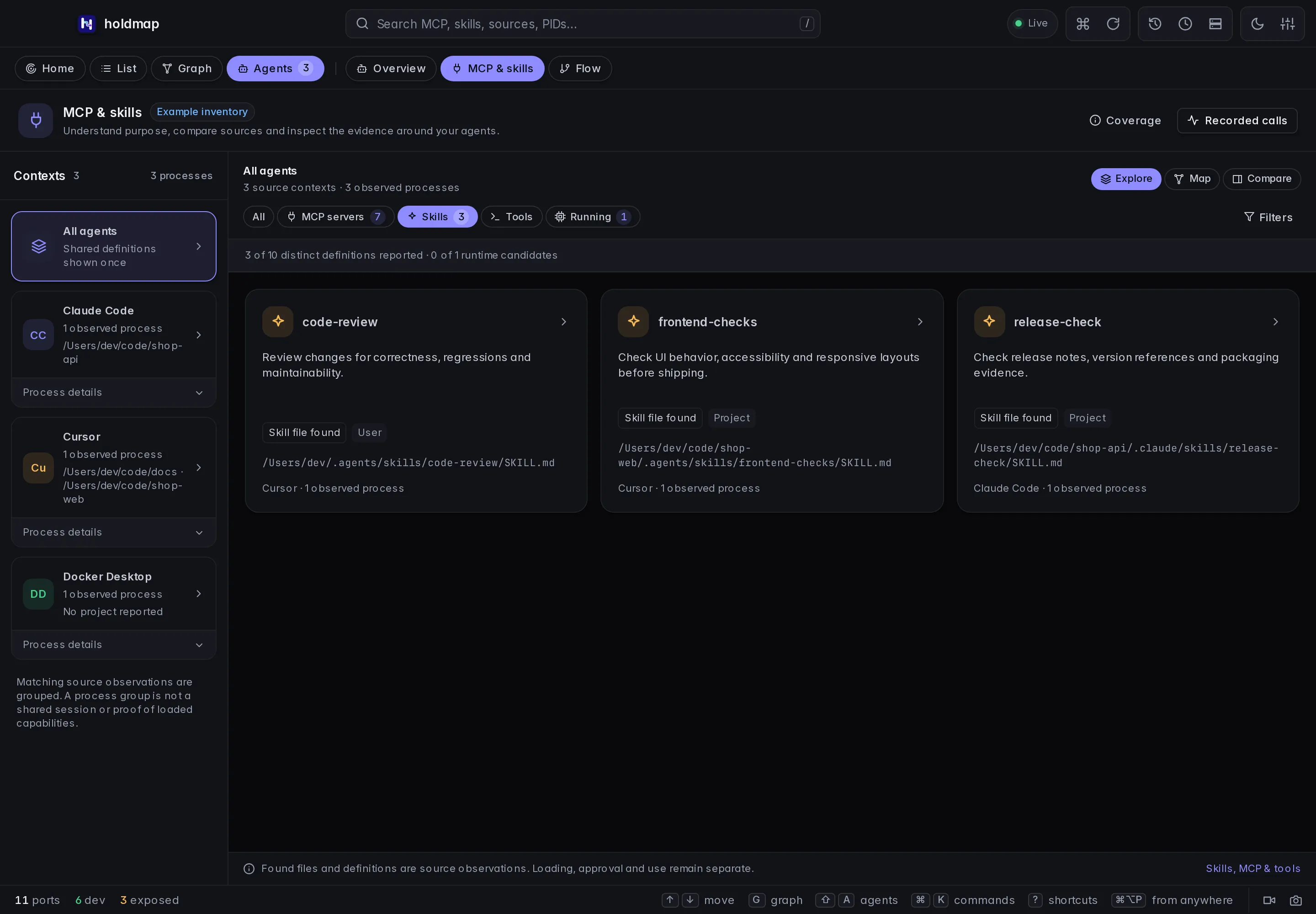
The workspace loads only after explicit navigation. Search, scope/state filters, comparison selectors and dismissible narrow-window details support the same observed inventory. Capability explorer, supported sources and limits.
Upgrade
Update the CLI and desktop separately:
- Run the current CLI installer from Install, then check
holdmap --version. This updates the CLI, TUI and MCP server. - Download the published desktop installer for your OS and architecture. Quit Holdmap, install it, reopen the installed copy and check Settings → About, including its running-app location. Updating the CLI does not replace the desktop app.
Published installers have no signed updater feed, so desktop updates are manual. macOS apps are ad-hoc signed without Developer-ID signing or notarization, and Windows installers are unsigned. Check the release’s SHA-256 checksums and build provenance before opening a new download. First open explains the platform controls.
Optional activity recording keeps its metadata contract; use matching clients and collectors for reported MCP aliases and skill activations. Every fresh recording session uses a new local endpoint and token; recopy its producer settings and restart the producer. Recording setup.